
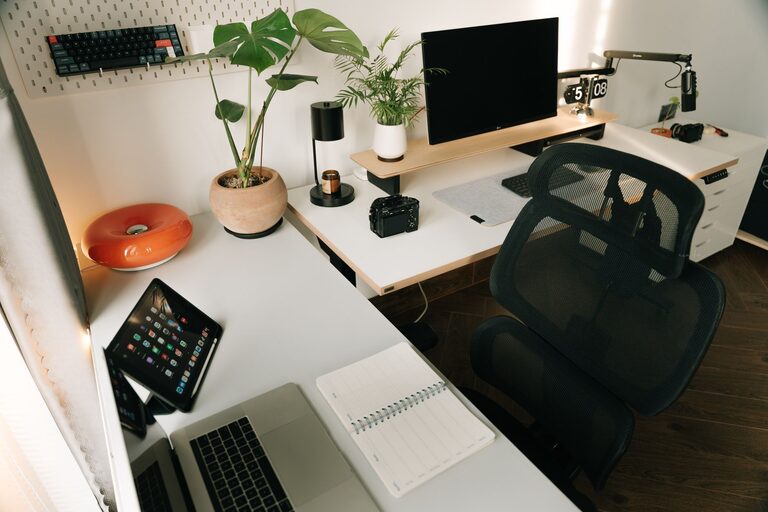
Creating a productive home workspace is essential for anyone working remotely or spending more time on tasks at home. A well-organised and comfortable environment can help improve focus, reduce distractions, and enhance your overall work experience. Whether you have a dedicated room or a small corner, here are some simple tips to set up a workspace that works for you.
Choose the Right Spot
Finding the ideal location for your workspace is the first step. Consider these factors:
– Natural Light: Position your desk near a window if possible. Natural light helps reduce eye strain and boosts mood.
– Quiet Area: Pick a spot away from household noise to minimise distractions.
– Space: Ensure there is enough room for your desk, chair, and essential equipment.
– Privacy: If possible, choose a space where you can close the door or create a visual separation.
Invest in Comfortable Furniture
Comfort is key to staying productive throughout the day.
– Ergonomic Chair: A chair that supports your lower back and encourages good posture prevents discomfort.
– Desk Height: Your desk should allow your forearms to rest comfortably at right angles when typing.
– Desk Size: Choose a desk with enough surface area for your computer, notepad, and other tools.
Organise Your Tools and Supplies
Keeping your workspace organised reduces stress and time spent searching for items.
– Essential Items Only: Keep only necessary work tools on your desk to avoid clutter.
– Storage Solutions: Use drawers, shelves, or organisers to keep papers, stationery, and cables tidy.
– Cable Management: Use clips or ties to keep cords neat and prevent tangling.
Set Up Proper Lighting
Good lighting is important to avoid eye strain and maintain alertness.
– Layered Lighting: Combine natural light with task lighting, such as a desk lamp.
– Adjustable Lamps: Choose lamps with adjustable brightness or direction for flexibility.
– Screen Position: Position screens to reduce glare from lights or windows.
Minimise Distractions
Creating an environment that helps you focus involves reducing interruptions.
– Turn Off Notifications: Silence non-essential phone and computer notifications during work time.
– Use Headphones: Noise-cancelling headphones or background music can help mask household noises.
– Set Boundaries: Communicate your work hours with housemates or family members.
Personalise Your Space
Adding personal touches can make your workspace inviting and motivating.
– Plants: Small indoor plants improve air quality and add a calming effect.
– Decor: Choose art, photos, or objects that inspire you without causing distraction.
– Comfort Items: Consider a cushion, wrist rest, or footrest for extra comfort.
Keep Your Workspace Clean
A clean workspace promotes clarity and productivity.
– Daily Tidy-Up: Spend a few minutes each day clearing your desk and organising materials.
– Weekly Deep Clean: Wipe surfaces, keyboards, and screens regularly to maintain hygiene.
– Declutter Often: Periodically review what you keep in your workspace and discard or store unused items.
Establish Routines and Boundaries
Defining when and how you work helps maintain productivity.
– Set Work Hours: Stick to regular start and finish times to separate work from home life.
– Breaks: Take regular short breaks to rest your eyes, stretch, and recharge.
– End-of-Day Ritual: Have a routine to signal the end of your workday, like shutting down your computer or tidying your desk.
Use Technology Wisely
Technology can be both a help and a hindrance.
– Reliable Equipment: Have a good quality computer, internet connection, and accessories.
– Productivity Apps: Use apps for time management, note-taking, or task lists to stay organised.
– Limit Open Tabs: Keep only the relevant applications or browser tabs open to stay focused.
—
By thoughtfully designing your home workspace with these straightforward tips, you can create an environment that supports your productivity and well-being. Remember that a good workspace adapts to your needs and preferences, so feel free to adjust your setup until it feels just right.